Committed for Apple Watch
A sobriety counter for Apple Watch.
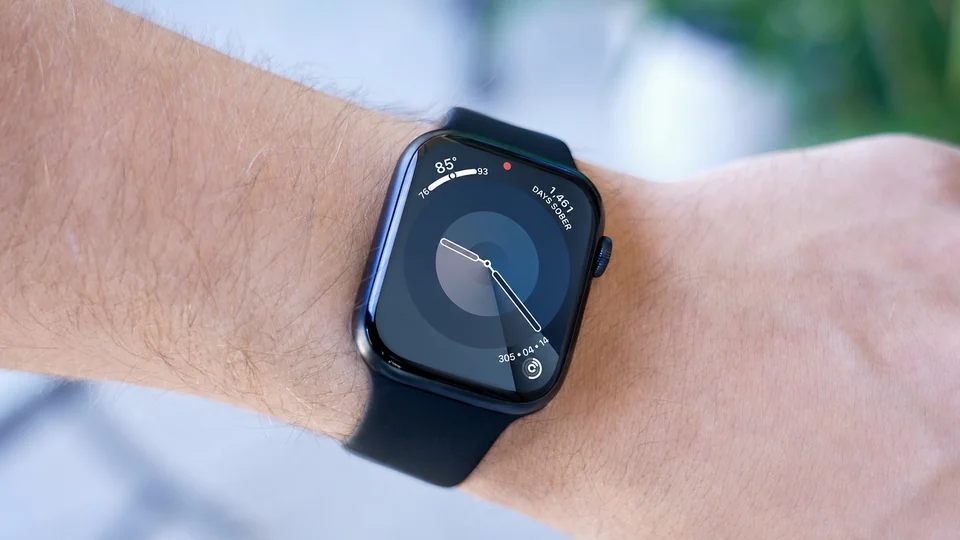
See your sober days on your watch face, or open Committed to check your commitments and milestones.
Apple Watch support requires Lifetime Unlock, an optional one-time purchase in the iPhone app. It includes the Watch app and complications for supported watch faces. No subscription.
iPhone with iOS 18.6 or later · Apple Watch with watchOS 11.0 or later
What it shows
The same commitment, easier to check.
- Watch app
- Open your commitments and see the time and milestones connected to each one.
- Complications
- Add your progress to supported watch faces for a faster glance.
- Multiple commitments
- Track sobriety, nicotine, social media, or another commitment in the same app.
- Price
- The iPhone app is free to use with no time limit. Watch support is included with the optional Lifetime Unlock, a one-time purchase. See your local App Store for pricing.
On your watch face
Add a Committed complication.
Once Committed is installed on your Apple Watch, edit a compatible watch face and choose Committed for a supported complication slot. The available slots depend on the face you use.
You can also open the Watch app itself to view your commitments and milestones.
Privacy
Use it without creating an account.
Committed stores your information on your devices. If you enable backup, it syncs through your private iCloud account. The developer cannot view your commitments.
The app contains no advertising or analytics SDKs. Read the full privacy policy.